Meta Prompting
One of the first benefits I found when using Large Language Model (LLM) was that they helped with the blank page problem. I could quickly go from a blog idea to a rough outline in just a few minutes.
While understanding the core principles of prompt engineering is still important, not using LLMs in the process of writing prompts just doesn’t make any sense.
In the same way that an LLM can help a writer overcome the blank page problem, it can also help prompt engineers establish a solid prompt structure.
This process of using LLMs to write prompts and using prompts to create other prompts is called Meta Prompting. Rather than crafting every detail of your prompt, you can use other prompts, systems, and LLMs to help expedite the process.
In this article, we’ll dive into how meta prompting works, breaking down some of the latest and most popular methods from recent research papers. We’ll cover plenty of examples so you can start using these techniques in your workflows and apps right away. Plus, you’ll be able to see how we’ve integrated meta prompting into PromptHub to make the prompt engineering process extremely efficient.
What is Meta Prompting?
Meta prompting is a prompt engineering method that uses large language models (LLMs) to create and refine prompts.
Unlike traditional prompt engineering, where you write a prompt from scratch and hope for the best, meta prompting guides the LLM to adapt and adjust your prompt dynamically, based on your feedback, allowing it to handle more complex tasks and evolving contexts.
Now we’ll jump into a variety of the latest meta-prompting methods based on latest research.
PromptHub’s Prompt Iterator
Many meta-prompting techniques involve a cycle: generating outputs, collecting user feedback, refining the prompt, and repeating the process.
Our new Prompt Enhancer, the Prompt Iterator automates this entire workflow, allowing you to submit feedback, run prompts, and let the LLM refine them for you. Feel free to try it out for free in PromptHub - it’s available on all plans!

Meta-Prompting
The first meta-prompting method we’ll look at is simply called Meta-Prompting, developed through a collaboration from Stanford and OpenAI.
The core idea behind Meta-Prompting is to use an LLM as a conductor that can manage complex tasks by leveraging multiple independent LLMs that are experts in certain areas. This is similar to multi-persona prompting in that it is a collaboration between different LLMs with a lead conductor.
How It Works
- The central LLM receives a high-level “meta” prompt (copied below), that includes instructions to break down tasks into subtasks.
- Each subtask is assigned to an “expert” LLM with specific, detailed instructions
- The central LLM oversees communication between the expert LLMs, synthesizes their outputs, applies its own judgement, and generates a final output.
Pros
- Meta-Prompting is task-agnostic.
- The central model’s ability to coordinate multiple experts enhances problem-solving capabilities, which means more accurate and aligned results
- Doesn’t require a bank of test data
Cons
- Increased cost and latencies due to many LLM calls and interactions between the experts
- Requires some configuration and set up to handle the inter-model interactions
- Potential context window issues handling large message histories
Meta Prompting prompt template
Here is the Meta prompting prompt template straight from the research paper:
META PROMPT TEMPLATE
You are Meta-Expert, an extremely clever expert with the unique ability to collaborate with multiple experts (such as Expert Problem Solver, Expert Mathematician, Expert Essayist, etc.) to tackle any task and solve any complex problems. Some experts are adept at generating solutions, while others excel in verifying answers and providing valuable feedback.
Note that you also have special access to Expert Python, which has the unique ability to generate and execute Python code given natural-language instructions. Expert Python is highly capable of crafting code to perform complex calculations when given clear and precise directions. You might therefore want to use it especially for computational tasks.
As Meta-Expert, your role is to oversee the communication between the experts, effectively using their skills to answer a given question while applying your own critical thinking and verification abilities.
To communicate with an expert, type its name (e.g., "Expert Linguist" or "Expert Puzzle Solver"), followed by a colon ":", and then provide a detailed instruction enclosed within triple quotes. For example:
Expert Mathematician:
"""
You are a mathematics expert, specializing in the fields of geometry and algebra. Compute the Euclidean distance between the points (-2, 5) and (3, 7).
"""
Ensure that your instructions are clear and unambiguous, and include all necessary information within the triple quotes. You can also assign personas to the experts (e.g., "You are a physicist specialized in...").
Interact with only one expert at a time, and break complex problems into smaller, solvable tasks if needed. Each interaction is treated as an isolated event, so include all relevant details in every call.
If you or an expert finds a mistake in another expert's solution, ask a new expert to review the details, compare both solutions, and give feedback. You can request an expert to redo their calculations or work, using input from other experts. Keep in mind that all experts, except yourself, have no memory! Therefore, always provide complete information in your instructions when contacting them. Since experts can sometimes make errors, seek multiple opinions or independently verify the solution if uncertain. Before providing a final answer, always consult an expert for confirmation. Ideally, obtain or verify the final solution with two independent experts. However, aim to present your final answer within 15 rounds or fewer.
Refrain from repeating the very same questions to experts. Examine their responses carefully and seek clarification if required, keeping in mind they don't recall past interactions.
Present the final answer as follows:
>> FINAL ANSWER:
"""
[final answer]
"""
For multiple-choice questions, select only one option. Each question has a unique answer, so analyze the provided information carefully to determine the most accurate and appropriate response. Please present only one solution if you come across multiple options.
In this example, the Meta Model (‘Meta-Expert’) directs the task to an Expert Mathematician and provides a clear instruction. This instruction is isolated, allowing the expert to focus on their specific task. The Meta Model then verifies the response and integrates it into the overall solution.
The template is also available in PromptHub, feel free to add it to your library!

Learning from Contrastive Prompts (LCP)
The next meta-prompting method we’ll check out is from an Amazon Comprehend paper called Learning from Contrastive Prompts (LCP): Automated Optimization and Adaption.
How It Works
- Starting with an initial prompt and a small training set containing input-output pairs, multiple prompt candidates are generated.
- The LLM generates outputs for each prompt candidate, which are then evaluated to identify where these candidates are succeeding and where they are falling short.
- LCP instructs the LLM to compare good prompts against bad ones, allowing the model to identify what is working and what isn’t.
- Based on this comparison, the LLM generates a new, refined prompt and continues to iteratively improve it.
Put briefly, the LLM is tasked with contrasting good prompts against bad ones, leveraging the comparison to refine prompts.
Pros
- LCP’s focus on contrasting both good and bad prompts can lead to a better optimization process and better final prompt variant
- LCP addresses the risk of overfitting by using multiple incorrect samples to create summaries of failure reasons, which enables the generation of a set of diverse prompt candidates
- This diversity enables exploration of the prompt space, preventing the model from getting trapped in a local minimum.
- LCP is also task agnostic
Cons
- High costs and latencies due to the need to generate, evaluate, and contrast multiple prompts in each iteration.
- The framework requires consistent feedback and evaluation to adapt effectively
LCP prompt template
Here are the LCP prompt templates straight from the research paper:
Reason Generation Prompt
Given input: {{ Input }}
And its expected output: {{ Output }}
Explain the reason why the input corresponds to the given expected output. The reason should be placed within tag <reason></reason>.
Summarization Prompt
Given input and expected output pairs, along with the reason for generated outputs, provide a summarized common reason applicable to all cases within tags <summary> and </summary>.
The summary should explain the underlying principles, logic, or methodology governing the relationship between the inputs and corresponding outputs. Avoid mentioning any specific details, numbers, or entities from the individual examples, and aim for a generalized explanation.
High-level Contrastive Prompt
Given m examples of good prompts and their corresponding scores and m examples of bad prompts and their corresponding scores, explore the underlying pattern of good prompts, generate a new prompt based on this pattern. Put the new prompt within tag <prompt> and </prompt>.

Good prompts and scores:
Prompt 1:{{ PROMPT 1 }}
Score:{{ SCORE 1 }}
...
Prompt m: {{ PROMPT m }}
Score: {{ SCORE m }}
Low-level Contrastive Prompts
Given m prompt pairs and their corresponding scores, explain why one prompt is better than others.

Prompt pairs and scores:

Prompt 1:{{ PROMPT 1 }} Score:{{ SCORE 1 }}
...

Prompt m:{{ PROMPT m }} Score:{{ SCORE m }}

Summarize these explanations and generate a new prompt accordingly. Put the new prompt within tag <prompt> and </prompt>.
In this example, the LLM evaluates multiple prompt candidates, learning from both their strengths and weaknesses. By contrasting the best-performing prompts with less effective ones, the LLM iteratively generates an optimized prompt, adapting to changes in the model version or task requirements.
Automatic Prompt Engineer (APE)
The next meta-prompting method comes from a paper out of the University of Waterloo called, Large Language Models Are Human-Level Prompt Engineers. Their meta-prompting method, Automatic Prompt Engineer (APE), treats the prompt as a “program,” optimizing it by searching over a pool of prompt candidates with the goal to maximize a specific score function.
How It Works
- Instruction Generation: An LLM generates a set of prompt candidates based on input-output demonstrations.
- Scoring and Evaluation: Each prompt is evaluated using a scoring function to measure its effectiveness.
- Iterative Search: The process iteratively uses a Monte Carlo search method, where LLMs refine the best prompts by proposing semantically similar prompt variants.
Generate a bunch of prompts, score and evaluate them, generate new semantically similar versions and select the prompt version with the highest score.
Pros
- APE’s experiment results consistently outperformed human-engineered prompts
- APE is adaptable and can optimize prompts for different scenarios (zero-shot, chain-of-thought, etc).
- APE is task agnostic
Cons
- The iterative search process can be computationally intensive
- Requires some dev work to spin up the system (the search process in particular)
Example Implementation using APE Templates
APE guides the LLM through generating, evaluating, and refining prompts in a structured, step-by-step process. Here’s a quick example flow of how it works using the templates from the research paper:
Step 1: Instruction generation
I gave a friend an instruction and five inputs. The friend read the instruction and wrote an output for every one of the inputs.

Here are the input-output pairs:
Input: [ ] Output: [ ]
Input: [ ] Output: [ ]

The instruction was...
In this first step, APE generates an initial instruction that could have led to the provided input-output pairs, setting up the foundation for the prompt.
Step 2: Zero-Shot Evaluation
Instruction: {{ step1.output}}

Input: [ ]
Output: <COMPLETE>
At this stage, the LLM evaluates how effectively the generated instruction from Step 1 performs when given new inputs. This helps identify how well the prompt works without any additional examples.
Step 3: Iterative Refinement
Generate a variation of the following instruction while keeping the semantic meaning.

Feedback: {{ step2.output}}
Input: {{ step1.output}}
Output:
Using the feedback from Step 2, the LLM refines the initial instruction, creating a new version that aims to be more effective based on the evaluation.
Step 4: Reverse Generation
I instructed my friend to {{ step3.output}} . The friend read the instruction and wrote an output for every one of the inputs.

Here are the input-output pairs:
Input: [ ] Output: [ ]
Input: [ ] Output: [ ]
...
This step helps APE further understand how the refined instruction maps to the given input-output pairs, ensuring that the prompt remains accurate and adaptable.
Step 5: Zero-shot-CoT (Chain of Thought) Incorporation
Instruction: Answer the following question.

Q: [INPUT]
A: {{ step4.output}}
Finally, the LLM incorporates a Chain Of Thought (COT) Chain of Thought reasoning into the prompt, enhancing its ability to handle more complex tasks in a zero-shot setting.
Summing it up:
- The LLM generates multiple instruction candidates based on initial input-output pairs.
- These candidates are scored based on their effectiveness.
- Through an iterative process, the LLM generates improved candidates, refining the instruction to achieve optimal performance.
PromptAgent
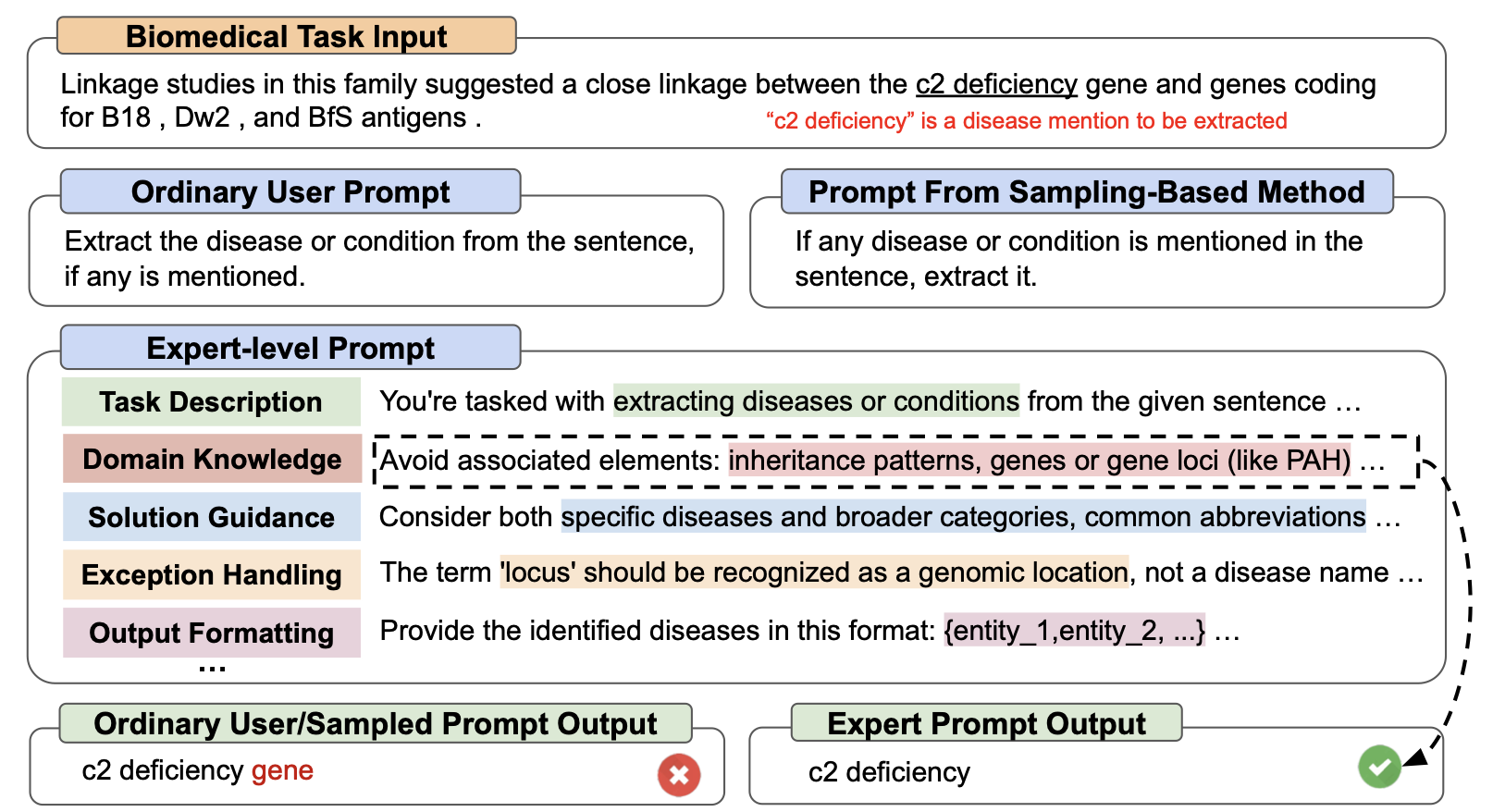
Next up is a meta-prompting method we’ll check out is called PromptAgent. PromptAgent views the prompt generation and optimization process as a planning problem and really tries to focus on leverage expert/SME knowledge in the prompt engineering process.
How It Works
- The process starts with an initial prompt and a target task.
- Outputs are generated and evaluated
- PromptAgent integrates expert-level knowledge in the feedback loops
- PromptAgent iteratively refines the prompt based on the feedback, growing the prompt space in a tree structure and prioritizing high-reward paths
Pros
- PromptAgent’s major differentiator is its focus on mimicking subject matter experts in the prompt engineering process, using expert-like feedback and insights to iteratively refine and optimize prompts.
- PromptAgent uses some prompt engineering to focus on leveraging expert-level knowledge
- The method effectively uses self-reflection and error feedback to achieve a higher level of precision and adaptability.
- AgentPrompt is task agnostic
Cons
- Implementing AgentPrompt in full requires setting up a tree like reasoning structure, which may be complicated and lead to higher costs
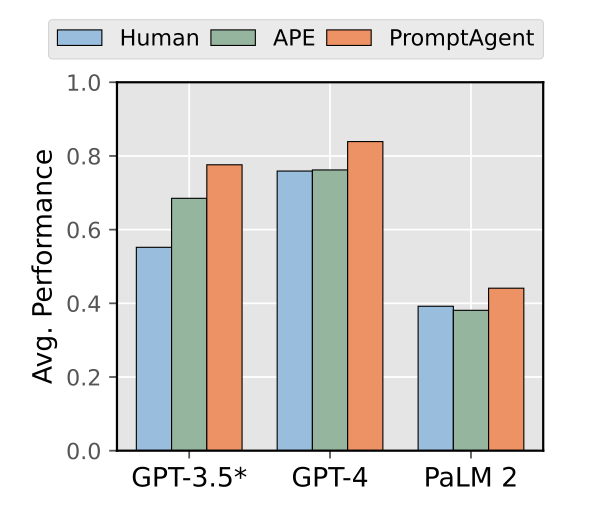
A graph comparing performance of human prompt engineers, APE, and PromptAgent
Example Implementation with PromptAgent
Here are the four core prompt templates directly from the PromptAgent.
input_format
{{prompt}}
{{task-prefix}}
{{question}}
{{task-suffix}}
{{answer-format}}
error_string
<<{index}>>
The model’s input is:
{{question}}
The model’s response is:
{{output}
The correct label is: {{label}}
The model’s prediction is {{prediction}}
error_feedback
I’m writing prompts for a language model designed for a task.
My current prompt is:
{{cur_prompt}}
But this prompt gets the following examples wrong:
{{error_string}}

For each wrong example, carefully examine each question and wrong answer step by step, provide comprehensive and different reasons why the prompt leads to the wrong answer. At last, based on all these reasons, summarize and list all the aspects that can improve the prompt.
state_transit
I’m writing prompts for a language model designed for a task.
My current prompt is:
{{cur_prompt}}
But this prompt gets the following examples wrong:
{{error_string}}

Based on these errors, the problems with this prompt and the reasons are:
{{error_feedback}}

There is a list of former prompts including the current prompt, and each prompt is modified from its former prompts:
{{trajectory_prompts}}

Based on the above information, please write {{steps_per_gradient}} new prompts following these guidelines:
1. The new prompts should solve the current prompt’s problems.
2. The new prompts should consider the list of prompts and evolve based on the current prompt.
3. Each new prompt should be wrapped with <START> and <END>.

The new prompts are:
Conversational Prompt Engineering (CPE)
I’m a huge fan of this next meta-prompting method. Conversational Prompt Engineering (CPE) is a simple chat-interface that guides users in creating and refining prompts through an interactive conversation.
How It Works
- First up, the user selects which model it wants to use (the “target model) and uploads a file with some input examples. For example, if the task is summarizing articles, the file could contain several full-length articles.
- The user and CPE go back in forth via a chat, asking relevant data-driven questions about output preferences. This interaction helps shape an initial prompt.
- Based on user feedback, CPE refines the initial prompt, and incorporates relevant details
- A prompt is created and is sent to a different model (”target” model) to generate outputs
- The user reviews the outputs and provides feedback some more feedback, adjustments are made as necessary
- Once all prompt outputs are approved, CPE generates a final few-shot prompt that includes examples approved by the user.
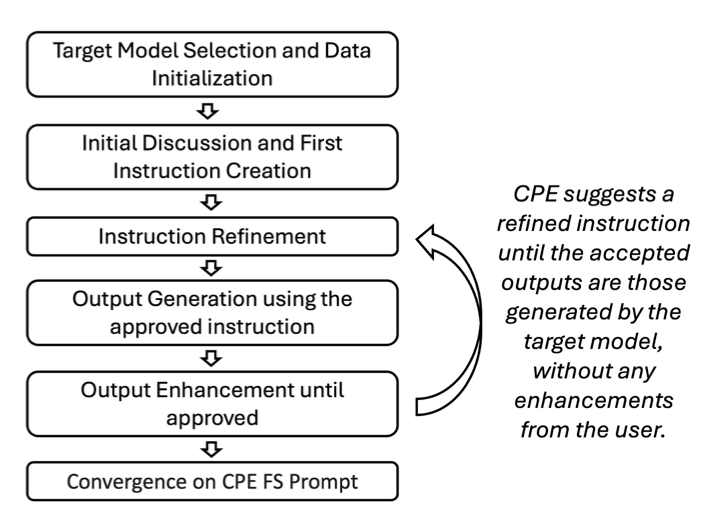
CPE conversation flow
Pros
- CPE makes it easy for users to generate personalized, high-quality prompts without needing labeled data or pre-existing prompts
- The simple setup of a chat interface makes it extremely user friendly and leads to better outputs based on feedback and quick iterations
- CPE is task agnostic
Cons
- The iterative nature of CPE might be time-consuming, as it requires multiple rounds of user feedback to refine the prompts fully.
- Potential memory issues
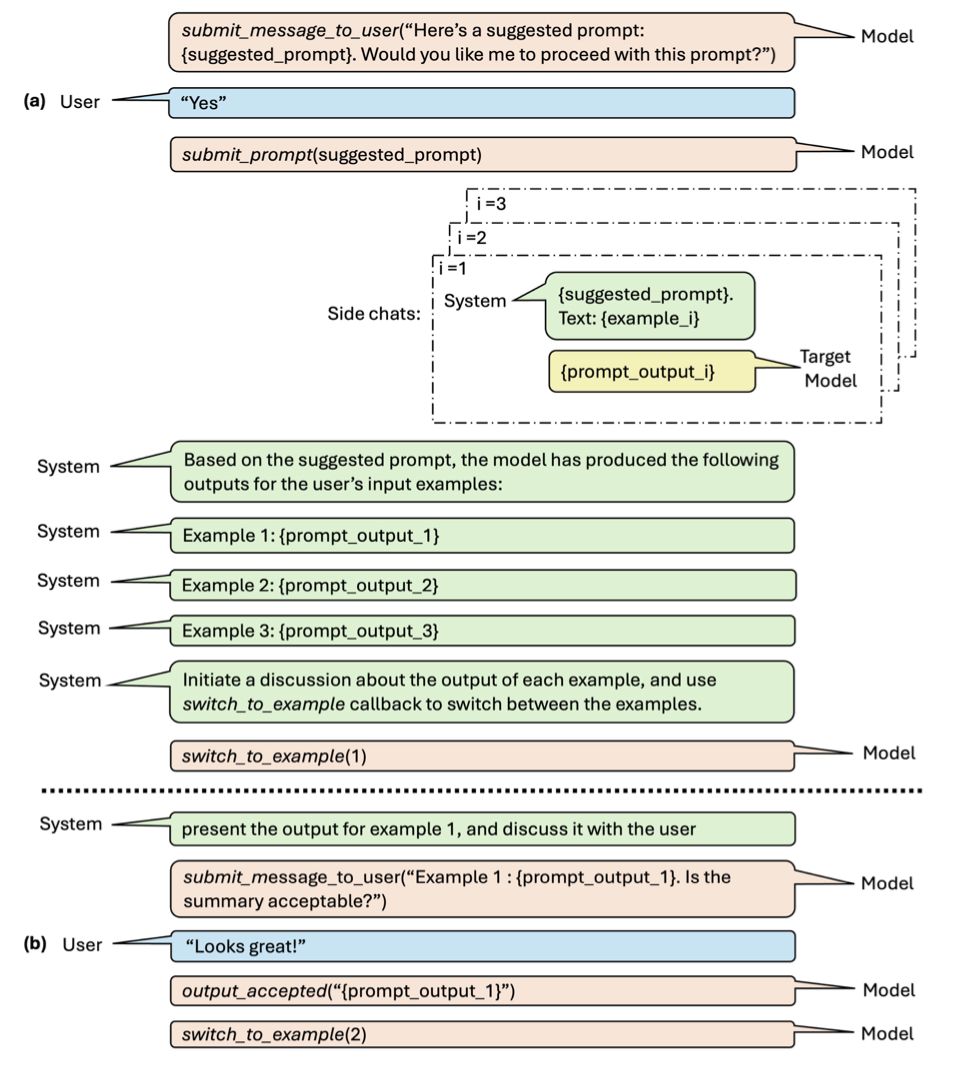
An example dialogue flow for CPE
Example Implementation
The following templates demonstrates how CPE operates:
Initialization:
You and I (system) will work together to build a prompt for the task of the user via a chat with the user. This prompt will be fed to a model dedicated to performing the user’s task. Our aim is to build a prompt that when fed to the model, produces outputs that are aligned with the user’s expectations. Thus, the prompt should reflect the specific requirements and preferences of the user from the output as expressed in the chat. You will interact with the user to gather information regarding their preferences and needs. I will send the prompts you suggest to the dedicated model to generate outputs, and pass them back to you, so that you could discuss them with the user and get feedback.

User time is valuable, keep the conversation pragmatic. Make the obvious decisions by your Don’t greet the user at your first interaction. You should communicate with the user and system ONLY via python API described below, and not via direct messages. The input parameters to API functions should be string literals using double quotes. Remember to escape double-quote characters inside the parameter values. Note that the user is not aware of the API, so don’t tell the user which API you are going to call. Format ALL your answers with python code calling one of the following functions:
API instructions:
**function submit_message_to_user(msg):** call this function to submit your message to the user. Use markdown to mark the prompts and the outputs.
**function submit_prompt(prompt):** call this function to inform the system that you have a new suggestion for the prompt. Use it only with the prompts approved by the user.
**function switch_to_example(example_num):** call this function before you start discussing with the user an output of a specific example, and pass the example number as parameter.
**function show_original_text(example_num):** call this function when the user asks to show the original text of an example, and pass the example number as parameter.
**function output_accepted(example_num, output):** call this function every time the user unequivocally accepts an output. Pass the example number and the output text as parameters.
**function end_outputs_discussion():** call this function after all the outputs have been discussed with the user and all 3 outputs were accepted by the user.
**function conversation_end():** call this function when the user wants to end the conversation.
User data intro:
The user has provided some text examples. I’ve selected a few of them that you will use in the conversation. Note that your goal to build a generic prompt, and not for these specific examples.
User data analysis:
Before suggesting the prompt, briefly discuss the text examples with the user and ask them relevant questions regarding their output requirements and preferences. Please take into account the specific character user’s expectations from the task output as expressed during the chat. Share the suggested prompt with the user before submitting it. Remember to communicate only via API calls.
Outputs intro:
Based on the suggested prompt, the model has produced the following outputs for the user input examples:
Outputs analysis
For each of 3 examples show the model output to the user and discuss it with them, one example at a time. Use switch_example API to navigate between examples. The discussion should take as long as necessary and result in an output accepted by the user in a clear way, with no doubts, conditions, or modifications. When the output is accepted, call output_accepted API passing the example number and the output text. After calling output_accepted call either switch_to_example API to move to the next example, or end_outputs_discussion API if all 3 have been accepted. Assume that the user comments relay to the output only. Only when the user explicitly says that he wants to update the prompt and not the output, show the updated prompt to them. Remember to communicate only via API calls.
Example switch:
You have switched modes. Look at the user comments and the accepted outputs for the previous examples, apply them to the model output of this example, and present the result to the user. Indicate the example (number), and format the text so that the output and your text are separated by empty lines. Discuss the presented output taking into account the system conclusion for this example if exists.
Outputs CoT start:
In the following discussion, the user was asked to give feedback on the model’s outputs that were generated by the prompt {{PROMPT}} . The outputs that did not meet the user’s requirements were modified.
Outputs CoT end:
Analyze the conversation above, and share the comments made by the user on Examples 1-3. Any comment should be shared, even if minor. If no comment has been made, accept the prompt. If any comment has been made, recommend how to improve the prompt so it would produce the accepted outputs directly.
Outputs discussion:
Continue your conversation with the user. Do the recommendations above suggest improvements to the prompt? If so, present the modified prompt to the user, and submit it only after the user approves it. Otherwise, if no modifications to the prompt are required, communicate it to the user and suggest to finish the conversation.
Conversation end:
This is the end of the conversation. Say goodbye to the user, and inform them that the final prompt that includes few-shot examples and is formatted for the <model> can be downloaded via the **Download few shot prompt** button below. Also, kindly refer the user to the survey tab that is now available, and let the user know that we will appreciate any feedback.